When ROAS falls, the instinct is to cut budget. But one blended ROAS number can make you cut a channel that still has efficient room to grow. First separate immature data, channel movement, and leakage after conversion before changing spend.
First check whether ROAS actually dropped
Revenue and purchase conversions can arrive after the click. In the latest day or two, spend may already be recorded while revenue is still incomplete. Align date range, conversion definition, and attribution window before comparing, then check whether the recent period has matured.
For a sudden movement, start with campaign anomaly detection. For a decline that persists across periods, use the sequence in ad performance diagnosis to narrow the scope.
Did CPA rise while ROAS fell, or did ROAS fall alone?
An overall ROAS of 300% can hide completely different channel stories. The average does not tell you what to fix.
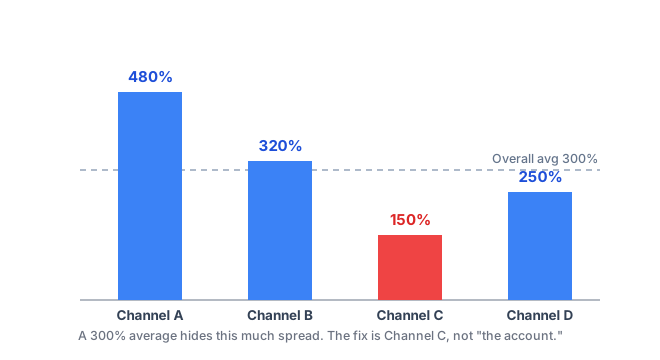
| Observation | Check first |
|---|---|
| One channel loses ROAS | Creative, targeting, bidding, and saturation in that channel |
| Every channel declines | Price, promotion, landing, checkout, or measurement changes |
| ROAS declines while CPA holds | Post-conversion purchase rate, order value, and revenue collection |
| CPA rises while ROAS falls | Which of CPM, CTR, and CVR moved first |
This does not prove a cause. It tells you whether the first action belongs in allocation, in-channel execution, or the conversion experience outside the ad account.
Three common causes of a ROAS drop
An allocation problem means money is still flowing to a saturated channel while another has room. An in-channel efficiency problem points to creative fatigue, targeting, or competition. A back-end problem means clicks and conversions hold while purchase rate, order value, or checkout flow weakens.
If CPA holds but ROAS falls, start after the conversion rather than with acquisition. The performance-metric chain shows which numbers to place next to each other.
How to move budget to improve ROAS
Channel A can have the best average ROAS and still be saturated, so the next unit of spend performs poorly. Channel B may have a lower average but a better marginal return right now.
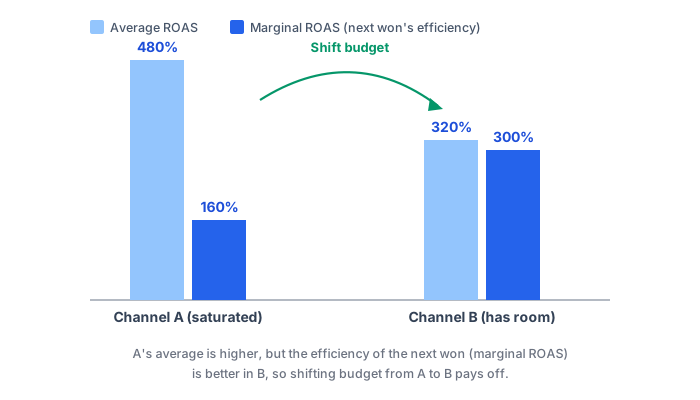
Reallocation is therefore not “put everything into the best-looking channel.” It is comparing where the next unit of budget is likely to produce a better outcome. Continue to the marketing budget allocation guide for the marginal-efficiency workflow.
Try this today
- Recheck ROAS with the same date range and conversion definition.
- Put channel ROAS, CPA, and spend share in one table.
- Pick one changed path and take one small action.
- Save the baseline and review date, then compare an equally long new window.
Do not call a reallocation causal merely because ROAS rose afterward. Validate consequential changes through a comparable control or a small experiment, as described in incrementality measurement.