Upload the same video to several platforms without thinking, and some crop it automatically while others reject it outright in review. Each platform demands different ratios, file sizes, and UI safe zones. However good the creative is, if the spec blocks it, it never serves.
Specs differ by platform
Image and video ratios (1:1, 4:5, 9:16), minimum resolution, and file-size caps vary by platform. And within one platform, feed, stories, and reels have different recommended ratios.
These specs change often, so memorizing them isn't worth much. Checking the platform's current official spec each time you set up a campaign is safer. Instead, master the original at the largest resolution with room to spare and crop per placement — then a spec change won't force a reshoot.
When creatives get rejected or cropped
Video has regions hidden by the UI
Vertical (9:16) video gets platform UI — like button, username, CTA — overlaid on top. The safe zone avoids that overlap. Keep essential captions, prices, and logos within it, and inspect cropping in previews for each placement and language.
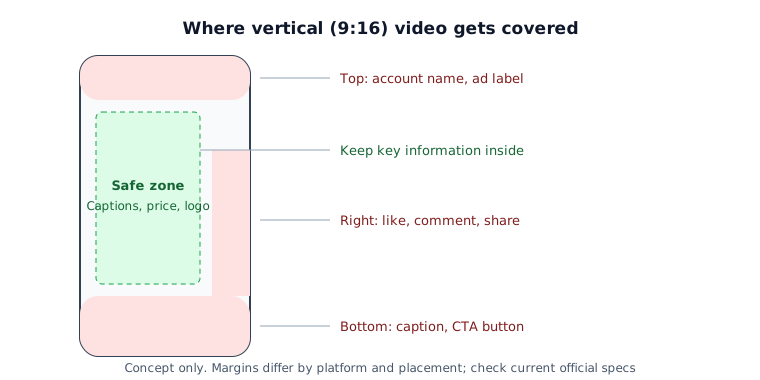
The bottom of the screen especially is where many platforms park the CTA button and account name. So text you can't afford to lose belongs in the middle to upper area. If you run in multiple countries, set the safe zone against the longest-translating language so it doesn't get clipped where the copy runs long.
Playable ads have tight size limits
Interactive (playable) ads follow each platform's size, packaging, and external-request rules. There is no single IAB size cap to apply across all platforms. In practice:
- Replace bundled fonts with system fonts.
- Compress images and drop unnecessary frames.
- External server calls are often blocked, so inline every resource inside the file.
Why creative fails review
- Size over cap: playables especially often re-measure over the limit on a decompressed basis even when you thought there was room.
- External domain calls: calling an outside API from inside a playable is usually rejected.
- Auto-redirect / auto-click: sending users to the store with no user action is a policy violation.
- Key info outside the safe zone: this passes review but underperforms — a quiet failure that's easy to miss.
Once specs are met, the next question is how many to run on what budget — that is ad creative testing — and how to build the opening seconds is in the first three seconds of a video ad.
Pre-upload checklist
Even when the exact numbers come from platform documentation, the order of checks stays the same. Run these six lines right before uploading and most rejections and crops are caught early.
| Check | How to verify | What happens if you miss it |
|---|---|---|
| Ratio and resolution | Export separately for each placement's recommended ratio | Auto-crop cuts off captions or logos |
| Safe zone | Preview with the top, bottom and right UI visible | Price or CTA copy hidden behind buttons |
| Longest language | Preview multi-country creative in the language with the longest copy | Text clipped only in some countries |
| File size and length | Compare compressed size and video length with platform limits | Upload failure or review rejection |
| Sound off | Play start to finish on mute | The message does not land without captions |
| Landing match | Check that price and offers match the store or landing page | Policy rejection, lower conversion after the click |
Log each rejection reason as a line in your next production checklist. It cuts down on being rejected twice for the same thing.
Limits of this approach
Exact pixel and size numbers change constantly, so the moment you carve them into a post they risk going stale. Remember only the principle — that ratios, safe zones, and size caps exist — and check current numbers in the creative specs by platform guide or the platform's official docs right before you set up.