Meta Advantage+ App (AAP), like Google UAC, is a heavily automated campaign type. You can barely tune at the ad-set level; you set a goal at the campaign level and the algorithm handles the rest. Still, there are levers that decide the outcome.
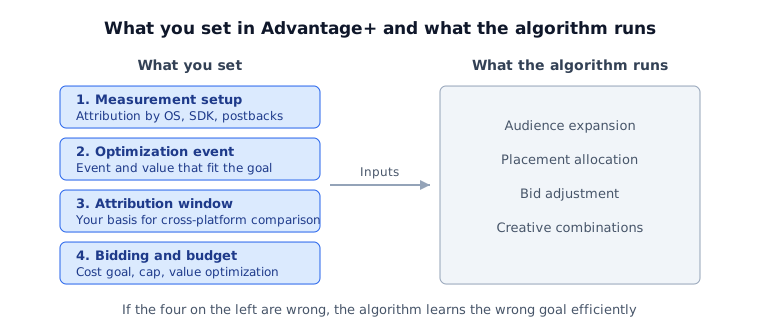
Separate OS measurement and setup requirements
Supported optimization, attribution methods and delay can differ by OS. Check app and OS requirements for the campaign, and segment reporting by OS and attribution method. Not all iOS performance is measured through SKAN alone.
Check optimization events and value delivery
Check supported events and value-optimization requirements for the selected app and campaign. Do not apply a historical web-domain AEM limit as a current universal eight-event-per-app rule.
Verify purchase/subscription amounts, currency and deduplication, then select the event that represents the business goal.
Attribution window — mind it when comparing platforms
Record the current ad set’s click/view attribution windows before comparing Google or TikTok reports.
Show a comparable reporting window where available, but a shared one-day-click basis does not remove overlapping attribution, modeling or measurement differences. Short windows also answer a different question for products with long purchase delays.
Choose bidding for the goal and constraints
Volume, cost goals, bid caps and value optimization are not a mandatory progression. Choose a supported strategy for the goal, budget, conversion volume and value data. Tighter limits may reduce delivery; evaluate volume and delay alongside cost.
Problems that snag often
- iOS install reporting suddenly drops sharply: check attribution method, postback delay, conversion tracking and budget/bid changes. A report decline alone does not establish a learning restart or lost installs.
- Value-based bidding but revenue is erratic: check whether the purchase event's revenue value is actually being sent and whether the Value Optimization toggle is on. SKAN reports have measurement windows, but that does not mean every iOS optimization signal is restricted to SKAN revenue.
What to check first when results swing
The most common mistake with automated campaigns is changing several settings the moment the numbers move. Decide where to look for each symptom, as in the table below, and you avoid touching settings that did not need changing.
| Symptom | Check first | Don't do right away |
|---|---|---|
| Installs steady, purchases down | Purchase event delivery, value and currency, deduplication | Switch the optimization event |
| iOS install reports dropped suddenly | Attribution method, postback delay, recent budget or bid changes | Rebuild the campaign |
| CPA spiked for a day or two | Whether it left the usual range (anomaly detection) | Rush a bid-cap change |
| Looks better than other platforms | Whether attribution windows and view-through are aligned | Move a large share of budget |
Change one setting at a time and log it with the date. Change several at once and you cannot tell later which one made the difference.
Limits of this approach
Advantage+ isn't always the answer. With a small budget or very narrow targeting, a standard campaign can win. The larger the budget and the broader the targeting, the faster automation fills its learning volume and the more it favors you. Detailed setup is in the Meta Advantage+ App optimization guide.