Run Apple Search Ads (ASA) as one lumped campaign, and a few days later the report may show brand terms taking most of the spend — people who may have searched for your app anyway. ASA sits at the top of App Store search and can reach high-intent users. To make that value repeatable, separate campaigns by purpose and run a loop for discovering terms, promoting Exact targets, and adjusting bids.
Split campaigns by purpose
ASA is usually split into four buckets by keyword type. Different purposes mean different CPA expectations and bid strategies.
- Brand: searches for your app or company name. Cheapest CPA, but high organic cannibalization risk (they may be coming anyway).
- Competitor: searches for rival app names. This is where you steal demand — pricier, with policy constraints to check.
- Category (generic): general terms like "budget tracker" or "workout log." This captures new demand from people who didn't know you.
- Discovery: Apple auto-explores related keywords. Promote the winners here into the campaigns above.
Mix purposes into one campaign and budget and bids tangle — cheap brand ends up eating the budget while the rest never learns. Split them, and "where the money actually is" becomes visible.
Match types: discovery and control
- Exact: the tightest control for validated keywords. Close variants such as misspellings, plurals, reordered words, and translations may still match.
- Broad: expands to variants and related terms. This is your discovery mode.
The operating loop sits between these match types. Explore with discovery and broad, find proven terms in the search-term report, promote them to Exact, and review poor performers for negative keywords. Running this discover → promote → block cycle is the backbone of ASA.
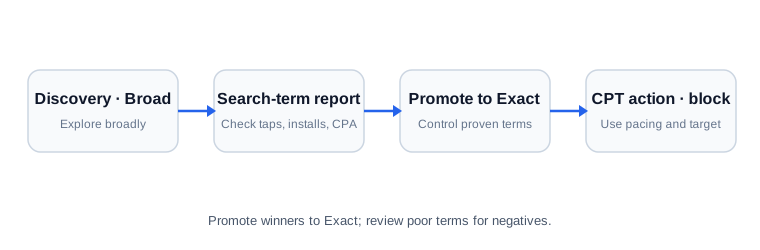
How to choose Exact-promotion candidates
Exact is not for any term that happens to look good. It is where you place a search term that is proven enough to deserve its own control. Check all three conditions:
- The term is still non-Exact, such as Search Match or Broad.
- It has enough volume to judge, for example at least 3 installs and 8 taps.
- It meets your target CPA.
When a term passes, add it as an Exact target and review the original target and negative structure in the next report. Promotion does not automatically mean you should pause Broad. Exact gives a proven term its own budget and CPT control.
Raise CPT when pacing is low and performance is good
If a campaign repeatedly spends far below its daily budget while CPA beats target, it may be missing auction opportunities. Before making a large budget change, raise CPT in a small step so you can isolate what changed. The thresholds below are this service's operating heuristics, not official Apple bid rules.
- Below 70% pacing while meeting target CPA: suggest CPT +10%.
- Below 40% pacing while meeting target CPA: consider CPT +15%.
If spend is high and CPA misses target, lower CPT instead.
- Above 110% pacing while missing target CPA: suggest CPT −10%.
- Above 140% pacing while materially missing target: consider CPT −15%.
Low pacing with poor performance is not a reason to raise CPT. Check the search term, product page, market, and seasonality first. High pacing with good performance is usually a budget-limit and incrementality question, not a reason to bid even higher.
The ASA Keyword Finder · CPT Actions tool applies these rules to a CSV and lists Exact-promotion, negative-review, and bid-action candidates.
Initial setup order
- Brand campaign (defense) — stop competitors from ranking above your name. But always check cannibalization.
- A few category Exacts — start learning on a handful of solid generic keywords.
- Discovery — hand it wide to Apple to gather candidates.
- Search-term report → promote / block, repeat — it sharpens as data accumulates.
Detailed steps are in the Apple Search Ads guide.
Check incrementality on brand keywords
Low brand CPA does not establish incrementality. Where feasible, use incrementality analysis with a comparison group, duration, and power specified in advance. No observed install drop after a pause does not prove zero effect; inspect uncertainty, seasonality, other advertising, and tracking changes too.
The bar for promoting the terms you find here to Exact is in ASA keyword expansion, and how much of that traffic converts on the store page is in App Store Optimization.
Limits of this approach
ASA's UI, match types, and policies keep changing. These are operating principles; check the current console and Apple's official documentation for setup screens, eligible settings, and bid limits before you build.