Apple Ads search results campaigns reach people expressing search intent. Whether to advertise depends on demand, acquisition value and budget.
When moving promising Search Match terms into Exact, also define the roles of the discovery and operating campaigns.
Overlapping terms can blur campaign responsibilities. Overlap alone does not explain an increase in CPT.
The short version:
Separate the campaign that finds from the campaign that spends. And always add a promoted term as a negative in the campaign it came from.
The two campaigns have completely different jobs
Discovery — this is where you find search terms. Open it wide with Search Match or broad match and watch which terms actually convert. The goal here is not efficiency, it is candidate discovery. A weaker CPA is acceptable only within the exploration budget agreed in advance.
Exact — this holds only validated terms, on exact match. This is where the budget goes and where efficiency is managed.
Move terms that proved out in Discovery into Exact, and add each moved term as a negative back in Discovery. This separates the exploration scope; diagnose CPT changes independently.
Give Discovery an exploration budget and review cadence. Continue when new candidates are valuable; reduce or pause when budget or exploration value is low.
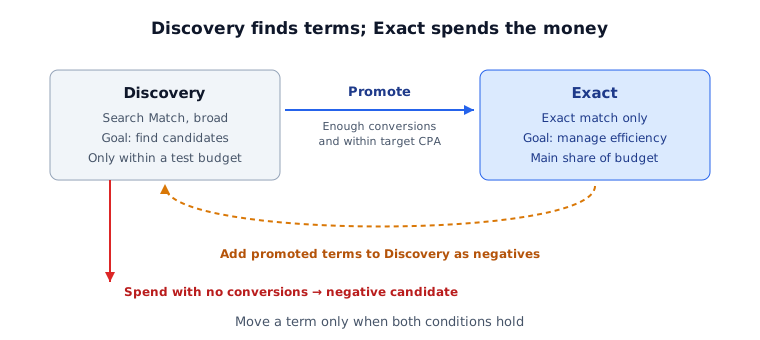
Promotion needs two conditions, together
When reading the search terms report, look at these two side by side.
One: have enough conversions accumulated to judge? One or two conversions can produce a flattering CPA purely by chance. A term showing $4 CPA on two conversions can easily settle at $30 once real volume runs through it — this is the single most common way a promotion disappoints.
Two: does the actual CPA meet target? Measured on those accumulated conversions, not on the two that looked good.
A term needs both to be a promotion candidate. Meeting one alone means not yet. Conversely, terms spending heavily with no conversions are negative-keyword candidates.
Feed the search terms report to ASA keyword discovery and it computes this verdict per term and exports the action list as CSV.
Read bids (CPT) alongside budget pacing
The most common mistake after promotion is adjusting on CPA alone. Two axes belong together.
| Budget left over | Budget fully spent | |
|---|---|---|
| CPA under target | Consider a bid increase after checking conversion maturity and demand | Consider more budget after checking marginal efficiency |
| CPA over target | Re-examine the search term itself | Consider a bid reduction |
The bottom-left cell is the confusing one. When CPA is poor and budget remains, check demand, bid competitiveness, relevance, store conversion and conversion delay. Those two numbers alone do not prove that a term is unsuitable.
And without a target CPA this table does not function at all. Moving bids up and down arbitrarily leaves you with no way to read direction, so setting the target comes first.
Brand terms need to be judged separately
Search terms containing your own brand name come back with overwhelmingly good CPAs. It feels great at first — "our ASA efficiency is incredible."
But a large share of those people would have found the app without the ad. By the time someone searches your brand name, they already know you.
Keeping brand terms in the same campaign as generic terms creates the illusion of a good overall CPA. Raising budget on that average does not guarantee a proportional increase in new users.
Split the campaign and evaluate it separately. For an incremental estimate, pre-plan a design suitable for incrementality analysis. Organic growth after stopping a campaign alone does not prove cannibalization; check seasonality, competition and control-group suitability.
How to read the search terms report for promotion candidates is in Apple Search Ads keyword optimization, and whether that traffic turns into installs is decided in app store conversion rate diagnosis.
Try this today
Export the term list in your Exact campaign and diff it against the Discovery negative list. Find Exact terms missing from Discovery’s exact-match negative list. Overlap with that negative list is the intended exclusion; missing terms are candidates for reviewing exploration overlap.
Check which campaign your brand-name terms currently sit in. If they share a campaign with generic terms, separate brand and generic CPA. The blended CPA is not itself false, but it answers a different question from new-user acquisition efficiency.
Limits of this approach
The promotion rule above narrows risk; it does not remove it. A term validated on 30 conversions can still behave differently at ten times the volume, because ASA is matching you to a different slice of searchers as spend grows. Promote in batches and re-check rather than moving the whole candidate list at once.
If the search terms report is too long to read by hand, upload it as is. Promotion, negative, and bid-adjustment candidates get split per term, and terms too thin to judge are honestly marked as withheld rather than given a verdict. Data is processed in your browser and never sent to a server.
After separating campaign roles, keep checking demand, conversion maturity and observed performance.
Official setup guidance: Apple Ads campaign structure.