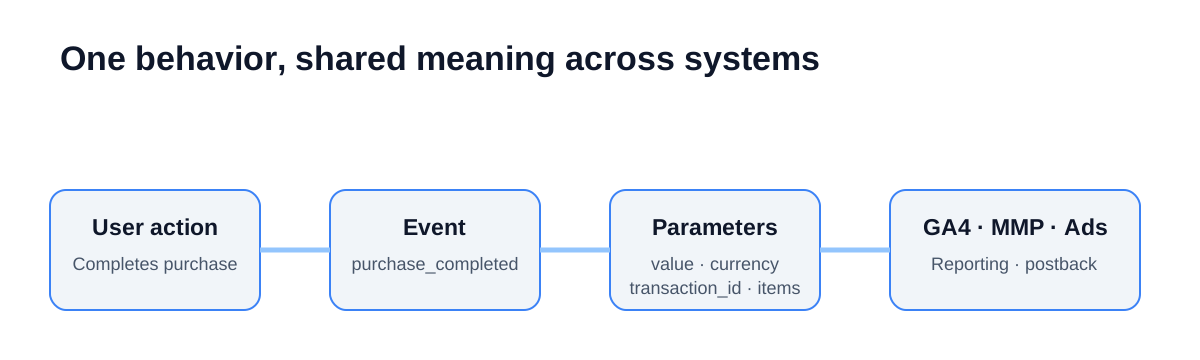
An event name describes the user action. Parameters describe its context and value. Keep that split: do not turn one event into a bag of screen, product, and payment details. It is how GA4, your MMP, ad platforms, and internal reports can read the same action with the same meaning.
An event taxonomy is not a screen inventory. It is the operating contract for event names, parameters, user properties, and firing conditions. SDK events need that same contract so that GA4, the MMP, and ad platforms do not attach different meanings to one conversion.
Separate action, context, and user state
| Layer | Question answered | Example | When it changes |
|---|---|---|---|
| Event | What did the user do? | signup_completed, purchase_completed |
Only when behavior definition changes |
| Event parameter | What object, method, or value was involved? | plan_id, payment_method, value, currency |
Per action |
| User property | What state is this user in? | membership_tier, acquisition_channel |
When user state changes |
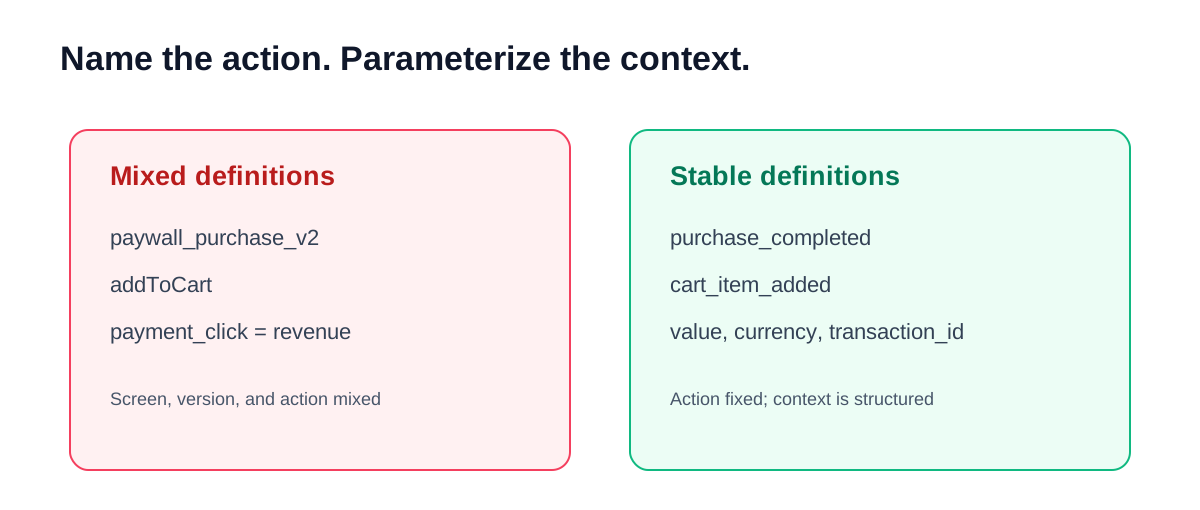
Avoid names such as paywall_screen_view that blend a screen and action. Record the view with a screen parameter. Record a completed purchase with a stable purchase event, then send payment method, item, and amount as parameters.
Where does your event design stand?
Keep naming rules small and strict
- Use lowercase
snake_caseonly. Never mixaddToCart,add-cart, andadd_cart. - Pick one semantic form, such as verb-object or object-result:
article_saved,signup_completed. - Keep screen, campaign, date, and version out of event names. Put changing values in parameters.
- Check automatic and recommended events plus reserved names before implementation.
GA4 provides recommended events such as sign_up, login, search, share, and purchase. Use a recommended event when its meaning matches your product definition; an ad hoc near-match can lose standardized reporting meaning. Review the GA4 recommended event reference and event naming rules before finalizing names.
Put the mapping in the spec, not in people’s heads
| Product action | Common event | Required parameters | GA4 | MMP and ad platform | QA rule |
|---|---|---|---|---|---|
| Signup completed | signup_completed |
method, signup_type |
map to sign_up where appropriate |
signup optimization event | once after success |
| Cart item added | cart_item_added |
item_id, quantity, value, currency |
map to add_to_cart |
upper-funnel signal if needed | no duplicate tap firing |
| Purchase completed | purchase_completed |
transaction_id, value, currency, items |
map to purchase |
revenue event and postback | once per verified payment |
| Subscription renewed | subscription_renewed |
transaction_id, plan_id, value, currency |
custom or defined business rule | value optimization signal | separate from original purchase |
If you send value, also send currency. GA4’s recommended ecommerce events require a three-letter ISO 4217 currency when value is set. Send a numeric amount without commas or currency symbols and define a unique transaction ID. AppsFlyer similarly documents that in-app revenue values must not contain comma separators, currency signs, or text. See the AppsFlyer in-app events reference.
Define when an event fires and how it deduplicates
An event name alone does not define the metric. A purchase can mean a button tap, a payment approval, or a settled order. Decide the rule explicitly.
- Fire success events after a server or another reliable success response, not on a UI click.
- Deduplicate network retries and app restarts with the same
transaction_id. - Document timezone and conversion-date rules across GA4, MMP, and the internal database.
- Keep failed, cancelled, and refunded states out of the success event.
Without these rules, ROAS can be inflated by duplicate transactions and platform, MMP, and payment numbers will diverge. When that happens, first separate attribution windows and reporting dates in attribution data mismatch analysis.
Treat a rename as a migration
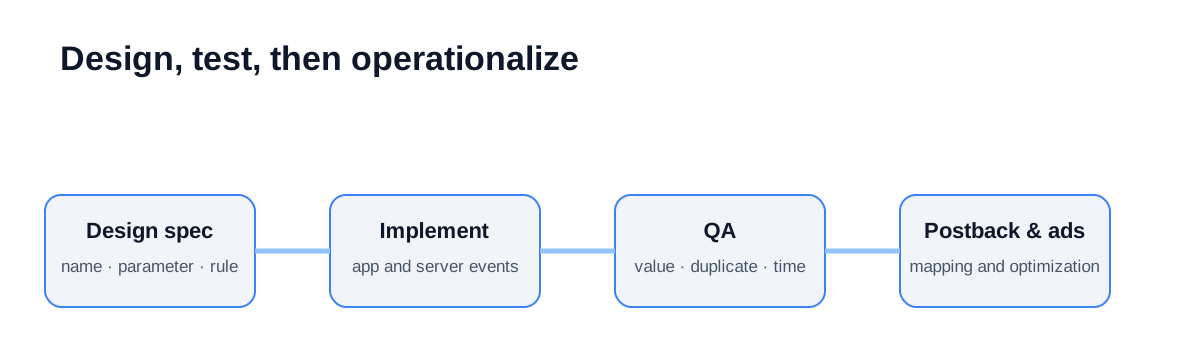
- Record why the definition changes and which reports, postbacks, and optimization events are affected.
- Add the new event or parameter version; fire both versions only for a defined transition if needed.
- Verify values and duplicates in GA4 DebugView, MMP test devices, and platform test events.
- Move reporting, postbacks, and optimization settings to the new version.
- Stop the older event on a scheduled date and document the time-series boundary.
During parallel firing, choose the reporting version and deduplication rule before both versions reach conversion, revenue, or bidding aggregates. Internal IDs and hashes do not by themselves guarantee anonymity.
GA4 exposes events and parameters in Realtime and DebugView, and provides a Measurement Protocol validation endpoint. Use an explicit pre-release validation path such as GA4 event validation.
Developer QA checklist
- Events describe actions and parameters describe context.
- Naming is consistent and automatic, recommended, and reserved events are checked.
- No PII is sent as an event name, parameter, or user property.
- Revenue has numeric
value, ISO 4217currency, and a deduplication ID. - Success, failure, retry, and duplicate rules are explicit.
- GA4, MMP, and ad-platform mapping is documented.
- A named owner verifies values, timezone, duplicates, and missing events on a test device.
- Version, start date, end date, and historical-data handling are recorded.
Conclusion: taxonomy is an operating contract
A stable taxonomy makes reports comparable, postback failures easier to locate, and ad platforms learn from the intended conversion signal. Start with a small set of core funnel actions and agree on their definitions before collecting more events.
Next, audit app-to-MMP-to-platform delivery with the postback integration guide, then review ATT and SKAN measurement for iOS measurement constraints.